
Graph & wires
A workflow is a directed graph of nodes joined by wires. Press ▶ Run and threadle executes it in dependency order.
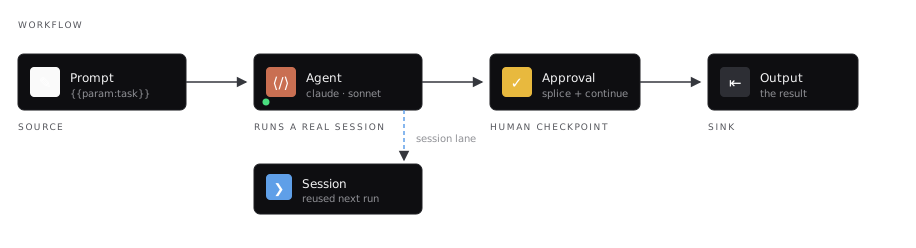
The shape almost every workflow starts as. The agent’s session is wired out to the side — that’s what makes the next run continue the same conversation.
Mental model
Section titled “Mental model”- Drop nodes from the palette, or drag a wire onto empty canvas and pick from the menu.
- Connect output → input. Incompatible pairs are refused while you drag.
- Optionally declare params and graph settings (ply, spend ceiling).
- Run, and watch the bottom dock — Run log for what happened, Issues for what blocks a start, Loose ends for soft hygiene.
How a run proceeds
Section titled “How a run proceeds”The runner is wave-based, not line-by-line:
- Sort the graph topologically. A cycle is a hard error — a workflow that can never finish never starts.
- Collect every node whose predecessors have all completed. That’s the wave.
- Execute up to ply of them concurrently.
- Check the graph spend ceiling.
- Repeat until nothing is left.
A node executes once, when its inputs are ready. Multiple wires into one input are joined with blank lines unless you put a knot there — and only if that handle still has capacity. Built-ins like Delay are 1 in · 1 out; a knot is multi-in · 1 out; custom named ports default to one wire unless the manifest sets maxConnections.
Node lifecycle
Section titled “Node lifecycle”| Status | Meaning |
|---|---|
| idle | Not in this run, skipped, or starved |
| queued | Scheduled, waiting its turn |
| running | Executing now (the node glows, its inbound wire marches) |
| success | Produced output |
| error | Failed — see Errors & retries |
Per-node controls
Section titled “Per-node controls”Right-click any node:
| Control | Effect |
|---|---|
| Mute | Skip entirely; downstream starves |
| Bypass | Don’t execute; pass inbound text straight through |
| Retry | Extra attempts with backoff on failure |
| Continue on error | Mark errored but keep the run alive |
| Run from this node | Partial run: this node and all descendants |
| Test this node | Partial run: only this node |
Partial runs
Section titled “Partial runs”Nodes outside a partial run’s scope don’t re-execute. They contribute their last known result, read-only:
| Node | Contributes |
|---|---|
| Prompt | its text |
| Output | stored content |
| Context | its materialized payload |
| Agent | the tail of its linked session |
| Session | the session reference |
That’s what makes it safe to fix stage four of a pipeline and re-run only the tail.
Canvas vs server jobs
Section titled “Canvas vs server jobs”Most full-graph ▶ Run presses start a server job (same as ≫). Partial runs and graphs that need interactive gates stay in the tab.
| In-tab (gates / partial) | Server job (▶ / ≫ / run --detach) | |
|---|---|---|
| Approval, live handoff, tripwire park | Interactive dock | Requires approve-all |
| Context nodes | Can materialize during the run | Must already have a payload |
| Result sessions | Wired onto the canvas | Statuses and outputs persisted to the graph |
| Survives closing the tab | No | Yes — reopen the workflow to resume watching |
See Running and Detached runs.
Frames
Section titled “Frames”A ▦ group frame is visual by default — dragging it carries its members. A frame linked to a saved sub-workflow is executable: wires into it resolve to the subgraph’s entry nodes, wires out come from its exit nodes. See Frames & sub-workflows.
Related
Section titled “Related”- Lanes & value types — what wires carry
- Ply — concurrency
- Knot — merging branches
- Tripwire — circuit breakers
- Running — the practical guide