
Tour of the app
threadle is one local server with two surfaces: a dashboard of views down the left, and the canvas you get when you open a workflow.
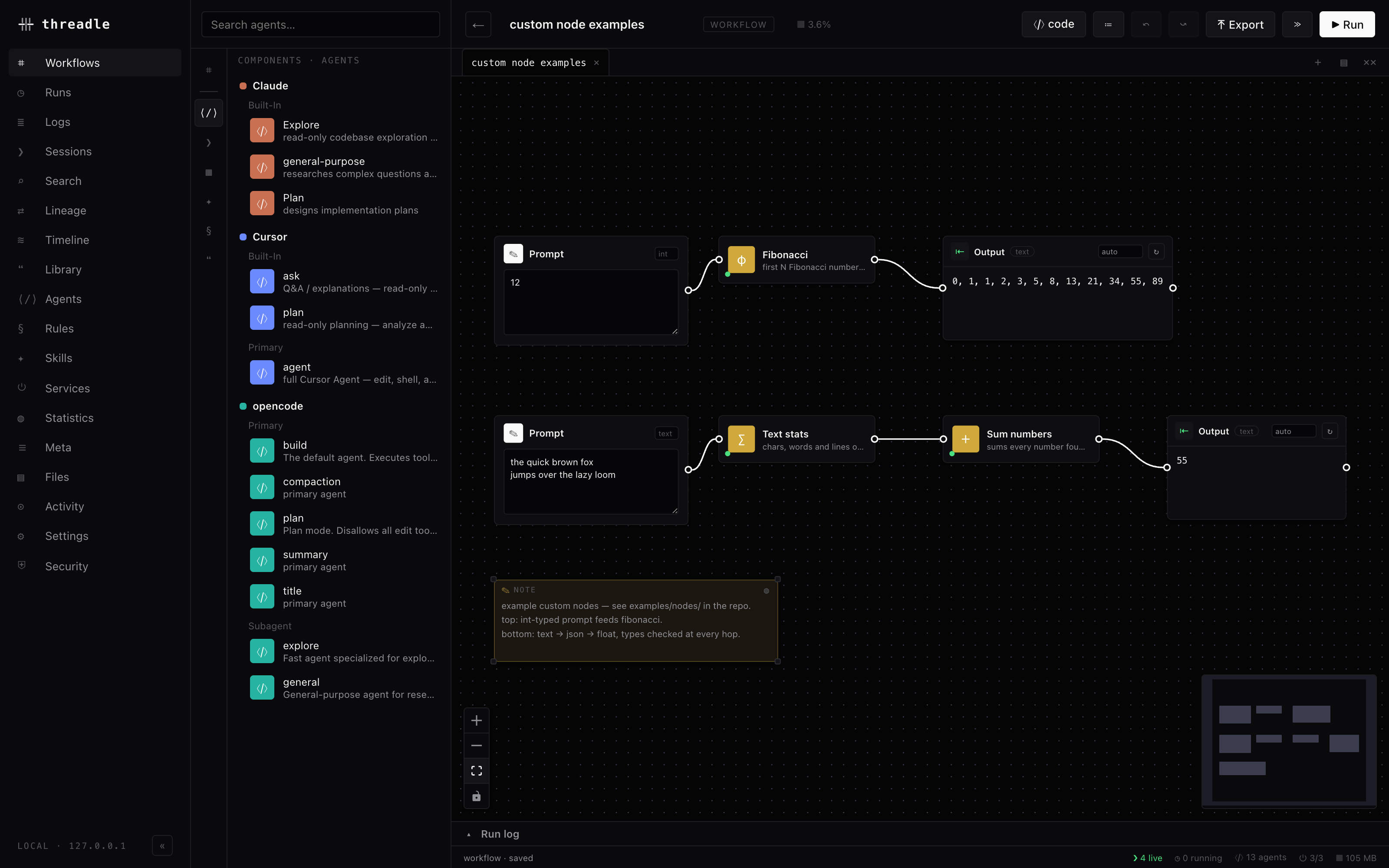
Dashboard nav on the left, component palette beside it, wired nodes on the canvas, run log docked at the bottom.
This page is the map. Each row links to the page that explains it properly.
Build & run
Section titled “Build & run”| View | What it’s for | |
|---|---|---|
| ⌗ | Workflows | Your saved graphs, recipes (jobs) and examples (teaching), plus import/export of portable graphs. Open one to get the canvas. |
| ◷ | Runs | Every run threadle has executed — live and historical — with status, duration, result session, errors, and cancel for anything still going. |
| ≣ | Logs | The server’s own log stream. Useful when a provider CLI misbehaves. |
The canvas itself is covered in Graph & wires and Running.
Understand what happened
Section titled “Understand what happened”| View | What it’s for | |
|---|---|---|
| ❯ | Sessions | Every discovered session across all providers — tokens, cache rate, cost, status. The entry point to a blueprint. |
| ⌕ | Search | Full-text search across every transcript and context payload. See Search. |
| ⇄ | Lineage | Which session fed which, through which payload, across tools. See Lineage. |
| ≋ | Timeline | Every session as a bar on one clock, provider-colored. See Timeline, diff & stats. |
| ◍ | Statistics | Tokens, cache economics, and costs — grouped overall, then per provider. |
| ⊙ | Activity | Recent movement across your tools, newest first. |
Inventory
Section titled “Inventory”| View | What it’s for | |
|---|---|---|
| ❝ | Library | The content-addressed store of every distilled summary and excerpt you’ve made. See Context library. |
| ⟨/⟩ | Agents | Every agent definition threadle discovered, and the sessions spawned from each. |
| § | Rules | CLAUDE.md, AGENTS.md, .cursorrules and friends, scanned across every project you’ve worked in. |
| ✦ | Skills | Skill sets found on disk, plus the ones you author or import. |
| ⏻ | Services | Per-provider health: installed, version, storage footprint, live sessions. See Providers. |
| ▤ | Files | Every file threadle and your agents keep on disk, grouped by tool, with sizes and exact paths. |
| ☰ | Meta | The cross-project scan: which projects have sessions, rules, and skills. |
Control
Section titled “Control”| View | What it’s for | |
|---|---|---|
| ⚙ | Settings | Editor opener, pricing source, billing mode, examples toggle, custom nodes. See Settings. |
| ⛨ | Security | What the server exposes and what it touches — the running counterpart to the trust model. |
The canvas, in one picture
Section titled “The canvas, in one picture”When you open a workflow you get:
- palette (left) — sessions, agents, context, custom nodes, and blocks to drop
- canvas (middle) — nodes and wires; right-click anything for its menu
- inspector (right) — the selected node’s settings (model, template, params…)
- topbar — ▶ Run (server job for most graphs), ≫ (explicit detached / approve-all), ≔ params and graph settings, ⤒ export
- dock (bottom) — Run log, Issues, and Loose ends, plus gate prompts when an in-tab run parks
Close the browser during a server run and reopen the workflow later — statuses and outputs sync from the job. Or use threadle jobs / logs while the server stays up.
Section titled “Close the browser during a server run and reopen the workflow later — statuses and outputs sync from the job. Or use threadle jobs / logs while the server stays up.”Related
Section titled “Related”- Quickstart — build something in five minutes
- Learning path — the ordered route through everything
- Keyboard & canvas — shortcuts and mouse gestures