
Session blueprint
A blueprint is one session auto-assembled into a node graph: a root node for the session, fanning out to everything it used. Open it from any session row (blueprint), the detail aside (⌗ blueprint), search hits, the timeline, or lineage.
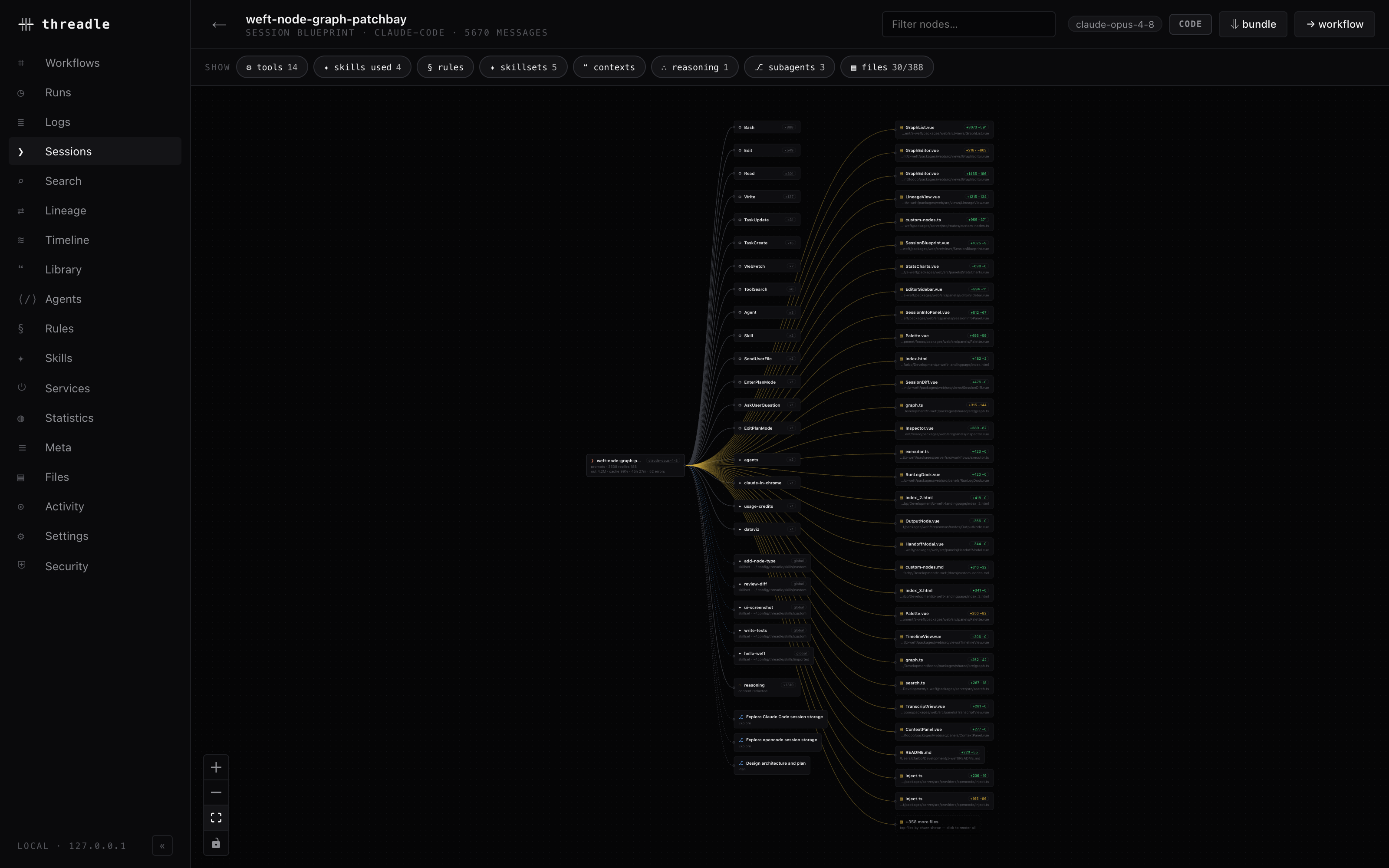
The session root on the left, fanning out to the tools, skills, subagents and files it touched.
Route: /blueprint/:provider/:id. Data: GET /api/sessions/:provider/blueprint/:id.
What gets assembled
Section titled “What gets assembled”The server walks the session’s full transcript (including abandoned branches where the provider keeps them) and tallies:
| Node kind | Glyph | Built from |
|---|---|---|
| tools | ⚙ | Every tool_use part, grouped by tool name, with up to 60 sample invocations |
| skills used | ✦ | Skill tool calls plus <command-name> slash-command envelopes in prompts |
| rules | § | Global + project instruction files that apply to the project dir |
| skillsets | ✦ | Skill artifacts on disk in the same scopes |
| contexts | ❝ | Payloads extracted from (↑) and injected into (↓) this session |
| reasoning | ∴ | Thinking blocks: count, char total, samples |
| subagents | ⎇ | Child runs — click through to their own blueprint |
| files | ▤ | Touched files with op, ± lines, bytes, edited line ranges |
Each toggle in the filter bar carries its count; the search box filters nodes by name, path, or preview.
The root node
Section titled “The root node”Shows the title, N prompts · M replies, then output tokens, cache hit %, duration, and tool-error count, badged with the model.
Selecting it opens the session rows — provider, id, project, model, agent, status, messages, tokens in/out/reasoning, cache read/write, cache hit, tracked costs, actual spend, permission mode, git branch, updated — plus the internals block:
| Metric | Meaning |
|---|---|
| context per request | Sparkline of context size across the session |
| peak / now | Largest and last observed context |
| compactions | Sharp drops — a previous point above 20k tokens followed by one under 55% of it |
| thinking | Reasoning blocks and a chars ÷ 4 token estimate |
| tool errors | Tool results flagged isError |
| duration | First to last message timestamp |
Context comes from per-message usage (input + cacheRead + cacheWrite) when the provider records it. When it doesn’t, threadle falls back to cumulative chars ÷ 4 and marks the figure ~est — the same ~ prefix used on estimated token counts everywhere.
Compaction points are drawn as dashed vertical ticks on the sparkline.
File nodes are sorted by churn (additions + deletions) and capped at 30. A +N more files node toggles the full list; clicking it again collapses back. Each file’s detail panel lists path, operation, ± lines, bytes written, last touched, and the edited line ranges when patch hunks exist — with an open in your editor action.
Downloads
Section titled “Downloads”| Download | Endpoint | Contents |
|---|---|---|
| ⇓ bundle | /api/sessions/:provider/bundle/:id | Blueprint + rendered context + reasoning + meta for the session and every subagent, one JSON |
| ⇓ download context | /api/sessions/:provider/context/:id | The active thread rendered to markdown — the reconstructed model context, with thinking and full tool I/O |
| ⇓ download reasoning | /api/sessions/:provider/reasoning/:id | Every thinking block, timestamped, as markdown |
The context download reconstructs what the model saw. The provider-side prompt cache itself is not inspectable.
Some models strip thinking text and keep only a signature. The blueprint says so — content: redacted by the model (signature only) — and hides the reasoning download, because counts survive but text does not.
Navigation
Section titled “Navigation”- Subagent detail → ⌗ open blueprint pushes the child blueprint with a breadcrumb back to the parent.
- → workflow seeds an editable canvas from this session plus its subagents.
- The back arrow returns to the parent blueprint, or to wherever you came from (
?from=timeline,?from=lineage), else the Sessions view.
The blueprint is a structural map, not a reader. For the message-by-message transcript use the Search result panel or double-click a session node on the canvas.
The same summary data (minus the graph) renders in the session info panel used by Sessions, Timeline, Lineage, and Search — including ❯ resume in terminal, which copies the provider’s resume command for the session’s project dir.
Related
Section titled “Related”- Sessions — discovery and the list view
- Cross-tool handoff — what the ❝ context nodes record
- Lineage — where those contexts went
- Costs & billing — how tracked and actual spend are computed