
Sessions
Every Claude Code, opencode, and Cursor Agent session already on this machine becomes a session in threadle. Nothing is imported, copied, or rewritten — provider storage is parsed read-only.
Discovery
Section titled “Discovery”| Provider | Storage read | Override |
|---|---|---|
| Claude Code | ~/.claude/projects/<slug>/<uuid>.jsonl | CLAUDE_CONFIG_DIR |
| opencode | ~/.local/share/opencode/opencode.db (session table) | OPENCODE_DATA_DIR |
| Cursor Agent | ~/.cursor/projects/<slug>/agent-transcripts/… + ~/.cursor/chats | CURSOR_CONFIG_DIR |
A provider is “available” when its storage exists (Cursor also counts when only the agent CLI is present). Unavailable providers are skipped silently; a parser that throws on one session drops that session, never the list.
Claude transcripts are scanned in one streaming pass per file, cached by mtime + size, so relisting is cheap.
The Sessions view
Section titled “The Sessions view”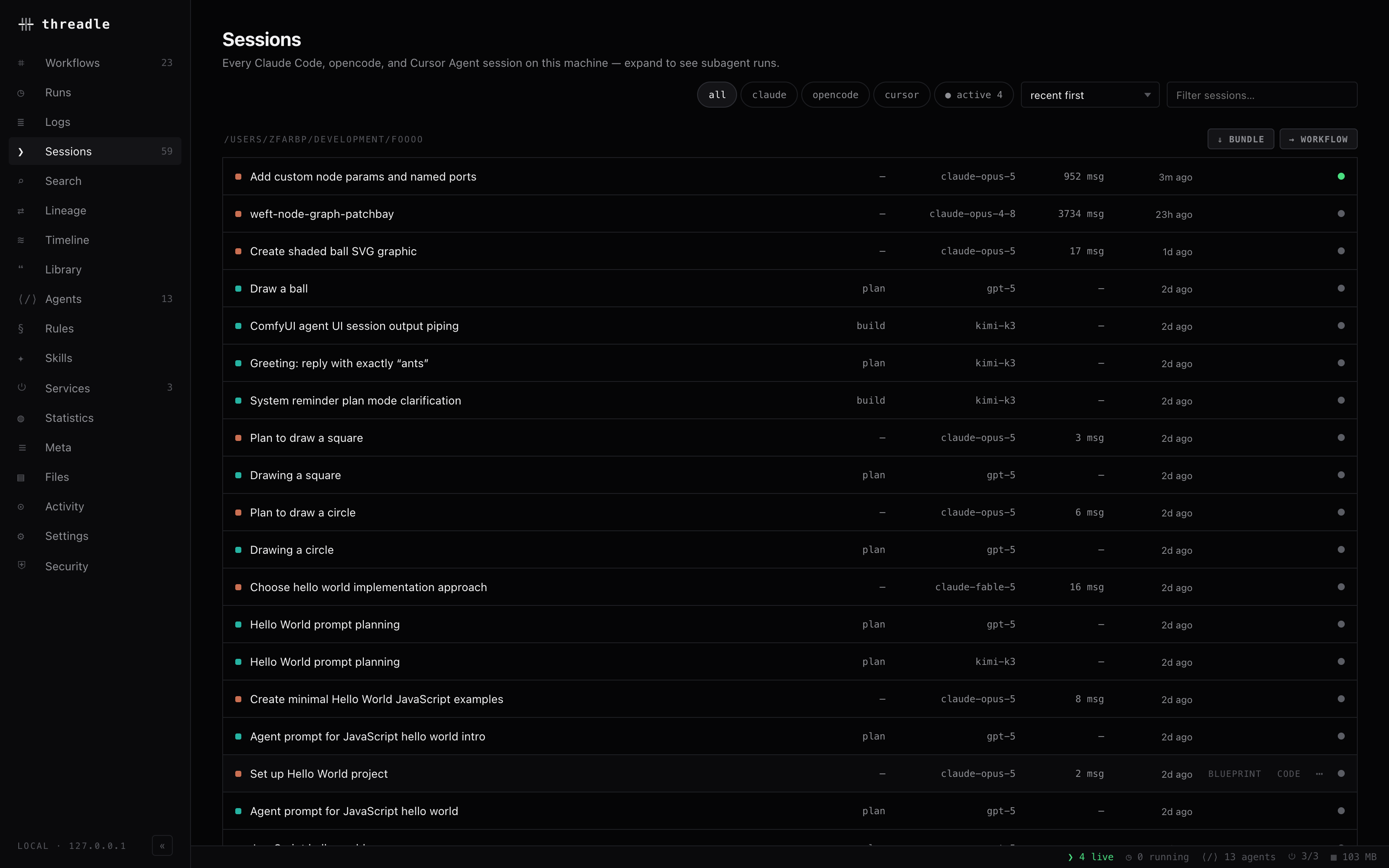
Every session on the machine in one list — provider dot, title, agent, model, message count, status.
Rows are grouped by project directory, newest group first. Each group header carries two actions:
| Action | Effect |
|---|---|
| ⇓ bundle | Downloads a JSON bundle for every session in the project |
| → workflow | Seeds a workflow with those sessions and their subagents |
A session row shows, left to right: the provider dot, title (or short id), agent, model (last path segment), message count, relative update time, row actions (blueprint, open-in-editor, ⋯), and the status dot.
The ⋯ menu holds Convert to workflow and Download bundle.
Token counts, cache rate, and dollars are not on the row — they live in the detail aside and in Statistics.
Filters & sorting
Section titled “Filters & sorting”| Control | Values |
|---|---|
| Provider chips | all · claude · opencode · cursor |
| ● active | Only sessions with status running (count shown on the chip) |
| Sort | recent first · most messages · most output tokens · title A–Z |
| Filter box | Substring match on title, project dir, or agent |
The list-level GET /api/sessions also accepts provider, projectDir, and q (title / id / project dir) for scripted use.
Selecting a session
Section titled “Selecting a session”Clicking a row opens the detail aside and expands that session’s subagent runs underneath it. The aside offers:
- ⌗ blueprint — the full session blueprint
- → workflow — seed a canvas with this session as a node
- ⇆ compare — pick a second session to open a session diff
- ⇄ hand off — distill and inject into another tool in one step (handoff)
Below the buttons sits the session info panel: identity and token rows, usage by model, context-window pressure, context handoffs, tools, skills, subagents, files, downloads, and ❯ resume in terminal (copies claude --resume / opencode -s / agent --resume, prefixed with cd <project>).
Subagent runs
Section titled “Subagent runs”Nested runs never appear in the top-level list — they are fetched per session and rendered as indented ⎇ rows.
| Provider | What a child is | Id shape |
|---|---|---|
| Claude Code | <project>/<sessionId>/subagents/agent-*.jsonl | <sessionId>/agent-<hex> composite |
| opencode | Rows with a parent_id | Normal session id |
| Cursor | Task-tool children linked at discovery | Normal chat id |
GET /api/sessions/instances returns every agent-tagged session plus these children, cached for 15 seconds — that’s what the Agents view counts.
Live status
Section titled “Live status”| Status | Meaning | How it’s determined |
|---|---|---|
| running | Generating right now | claude: ~/.claude/sessions/<pid>.json with a live pid · opencode: row touched in the last 45s · cursor: agent persist list |
| waiting | Claude session waiting on you | status: "waiting" in the pid file |
| idle | Known, not active | Default when no liveness signal |
| unknown | Provider reports no status | opencode rows before liveness merge |
Stale pid files are ignored — the process is probed with a signal-0 liveness check before its status counts.
File watchers on the provider storage push sessions.changed and live.status over /api/events; the workflow canvas refreshes session nodes from those events.
Related
Section titled “Related”- Session blueprint — the per-session deep view
- Cross-tool handoff — move context between tools
- Timeline, diff & stats — analysis views
- Costs & billing — tracked vs actual spend
- Providers — adapter details